Shell, explained
chmod 755, 644 and 777: what do the numbers mean?
chmod 755 deploy.sh
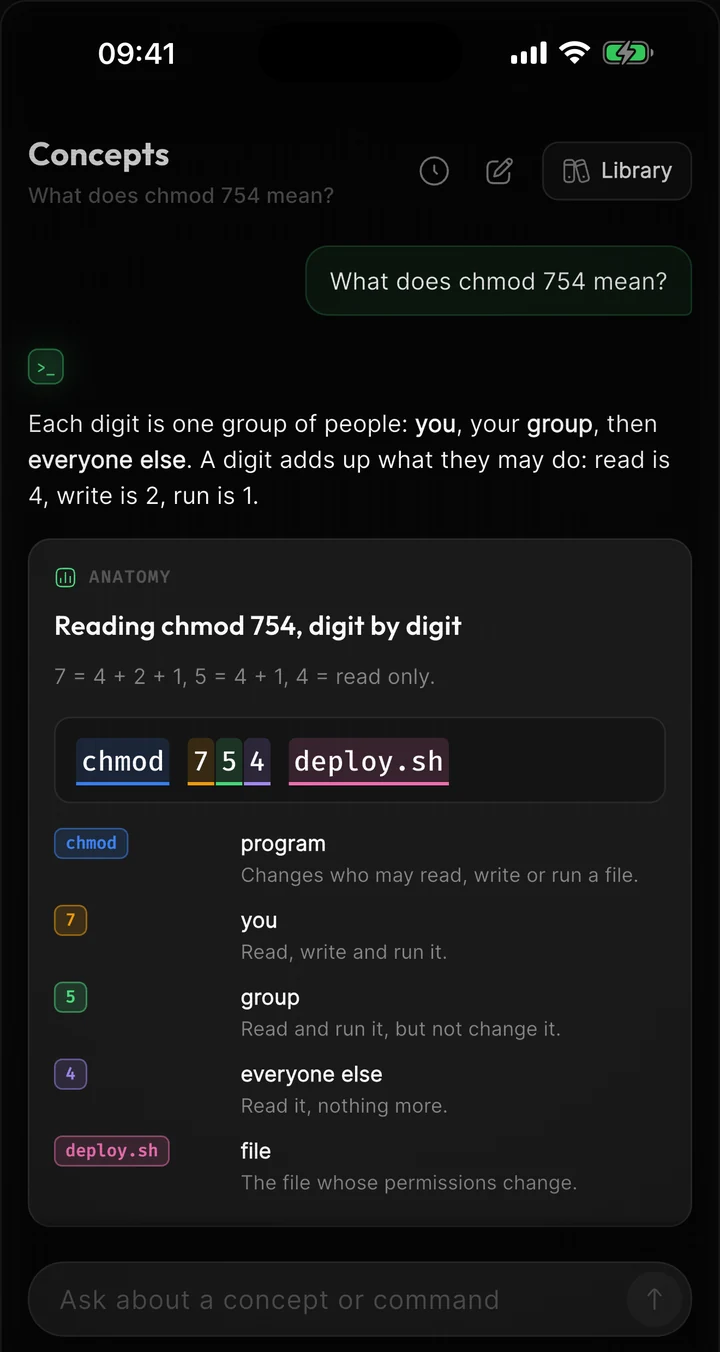
The three digits set permissions for three kinds of user: the file's owner, its group, and everyone else. Each digit is a sum of 4 (read), 2 (write) and 1 (execute). So 755 means the owner can read, write and run the file (4+2+1), and the group and everyone else can read and run it (4+1).
Three digits, three kinds of user
Every digit adds up the permissions that are switched on: r is worth 4, w is 2, x is 1. Switch them yourself, or try the common modes.
Tap r, w or x below to switch it on or off
4+2+1 = 7
4+0+1 = 5
4+0+1 = 5
- ana, the owner, can read, change and run it
- The staff group can read and run it
- Everyone else can read and run it
Why 777 is the wrong fix
777 switches on every bit for everyone, including write for any user and any program on the machine. It makes “Permission denied” go away by removing the protection.
Tap r, w or x below to switch it on or off
4+2+1 = 7
4+2+1 = 7
4+2+1 = 7
- ana, the owner, can read, change and run it
- The staff group can read, change and run it
- Everyone else can read, change and run it
Any user on this machine can rewrite deploy.sh
On a folder, x means “enter”
For a folder, r lists the names in it, w adds and deletes files, and x lets you go inside. With 644 on a folder, cd answers Permission denied.
Tap r, w or x below to switch it on or off
4+2+1 = 7
4+0+1 = 5
4+0+1 = 5
- ana, the owner, can list, add and delete files in and enter it
- The staff group can list and enter it
- Everyone else can list and enter it
Part by part
chmod- Changes the mode of a file: who may read, write and run it.
7- The owner: 4 + 2 + 1, so read, write and execute.
5- The group: 4 + 1, so read and execute, but not write.
5- Everyone else: read and execute as well.
deploy.sh- The file to change. You must own it, or use sudo.
Common mistakes
chmod 777 to silence an error
It works because it lets every user rewrite the file. Find out which user needs which permission instead: a script you run yourself needs 755 or 700, a web server's files usually need 644.
chmod -R 755 on a whole folder
It marks every file inside as executable, including text and images. chmod -R u=rwX,go=rX uses a capital X, which adds x only to folders and to files that already had it.
Try it
$ ls -l deploy.shThe first column shows the mode as letters: -rwxr-xr-x is 755.
$ stat -f '%Lp' deploy.shThe mode as digits on macOS. On Linux: stat -c '%a' deploy.sh.
$ chmod 600 ~/.ssh/id_ed25519Private keys must be readable by you alone, or ssh refuses to use them.
Questions
What does chmod 644 mean?
The owner can read and write (4+2), and the group and everyone else can only read (4). It is the usual mode for ordinary files that are not programs.
Is chmod 777 dangerous?
On a machine with other users or services, yes: anyone can replace the file's contents, and if it is a script, the next person who runs it runs their code. On your own laptop the risk is smaller, but 755 does the job without it.
What about a fourth digit, like 0755?
A leading digit sets three special bits: setuid (4), setgid (2) and the sticky bit (1). 0 means none of them, so 0755 and 755 are the same.
How do the digits relate to rwxr-xr-x?
They are the same nine bits written two ways. Split the letters into threes, rwx r-x r-x, and add up each group: 7, 5, 5.
Terminaster
Stop looking up the same command twice.
Ask about any command you run into and see what it actually does. Terminaster then brings it back just before you would forget it, until you can type it without searching.
The ideas behind it
Unix file permissions
Traditional Unix permissions store read, write, and execute bits for three classes: the file's owner, its group class, and others. The meaning of each bit depends on whether the object is a regular file or a directory.
Ownership and groups
A Unix filesystem object records an owning user ID and group ID. A process's effective user and group credentials determine which traditional permission class and other authorization rules apply to its access request.
umask
A process's file mode creation mask, or umask, clears selected permission bits from the mode requested when a new filesystem object is created. It supplies a default restriction, not the final mode for every creation.