Blog · · 9 min read
Wood rings, cloth gives: shared materials for touchable illustrations
Sink In teaches English phrasal verbs with small engraved animations, and many of them now react to a finger. For a while each scene invented its own way to do that. This is how they ended up sharing one set of materials instead: wood that knocks, brass that rings, cloth that gives.
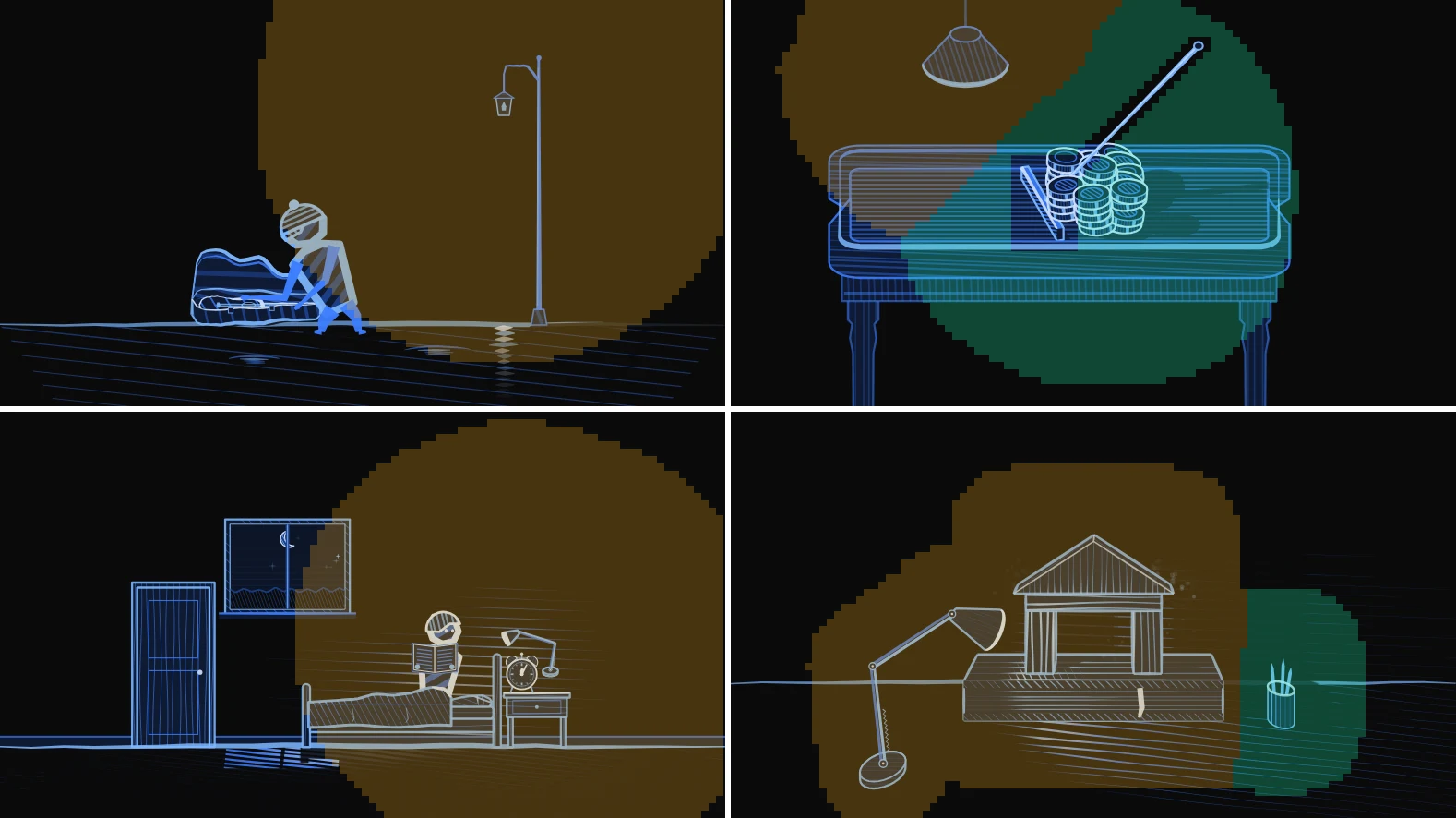
Every meaning in Sink In has a scene. Base on is a house standing on a book. Sleep in is someone staying under the covers while the sun climbs past the window. Put together is a bench whose loose parts join up. They are drawn in code, in Flutter, as light lines on a black page, like a scratchboard engraving.
Then the scenes started to answer touch. You can knock on the house, press the blanket, drag the desk lamp and watch its light and shadows move. Touch makes a picture feel like a thing, and a thing is easier to remember than a picture. But the way it grew was a mess, and this post is about cleaning that up.
- Material feels
- 8
- Scene families on the kit
- 17
- Kinds of haptic
- 3
- A fingertip
- 44 pt
Every scene had its own physics
The first touchable scenes were built one at a time, and each one grew its own small engine. The sponge had a spring. The seesaw had another spring with other numbers. The ball had its own squash. Four files counted haptic clicks by hand. A tap on a table did one thing in the workshop and something else in the café.
None of that was wrong on its own. Together it meant that a learner who touched ten scenes met ten slightly different worlds, and every new scene started from nothing. The fix was to notice that the scenes kept re-implementing the same question: what is this thing made of, and how does that feel?
A material says how it feels
The scenes already shared materials for drawing. An EngravedMaterial says how a surface is cut and how light falls on it: wood has grain, plaster only shows where light lands, glass has no body and two glints. So the touch went there too. Every material got a MaterialFeel.
The split that made it work: the scene decides what a touch means, the material decides how it feels. Knocking on a house and knocking on a brass lamp shade are the same gesture. The wood gives a short dull jolt; the brass rings.
static const wood = MaterialFeel(
  stiffness: 900, damping: 30,   // a stiff, quiet spring
  give: 0.05, wobble: 0.10,      // barely dents, barely shivers
  knock: 0.45,                   // how far a tap moves it
  flash: 0.7, flashSeconds: 0.38,// light a tap strikes out
  wave: 9,                       // how fast that light runs out
  bounce: 0.3, carries: 0.35,    // what it does to things on it
);

static const cloth = MaterialFeel(
  stiffness: 70, damping: 17,    // soft, creeps back without passing rest
  give: 0.9, folds: 1,           // a deep dent with creases round it
  lag: 0.12,                     // pulled along behind a dragging finger
  tap: MaterialHaptic.detent,    // a soft click in the hand
  bounce: 0, carries: 0.05,      // soaks a knock up
);
There are eight feels now. Each also picks one of three haptics, so the hand feels the material too.
| Feel | What a touch does | Haptic |
|---|---|---|
| Wood | Barely gives. A short dull jolt and a quick pale flash. | contact |
| Metal | Doesn’t give. Rings for about a second, its highlight shivering. | impact |
| Glaze, glass | Hard, a short ring, the glints flare. | contact |
| Stone | Dead hard, the dullest jolt. A short flash runs fast through the piece. | contact |
| Paper | Gives a little and springs back past rest. | detent |
| Leather | Firm, creases under a press, comes back slowly. Worn leather gives more. | detent |
| Cloth | A deep dent with folds, dragged behind the finger, creeps back. | detent |
| Soft | A sponge or cushion: squashes deep, springs back past rest and back. | detent |
Walls, tabletops and open ground have no feel at all, on purpose. The place a scene happens in is never touchable; only the things in it are.
One spring for everything
Every feel is one damped spring. A press holds it down, letting go lets it come back, a tap gives it a kick. Stiff, lightly damped metal rings; soft, heavily damped cloth creeps back without overshooting. The whole engine is a few lines:
void step(double dt) {
  var left = dt;
  while (left > 0) {
    final h = min(left, 1 / 120);          // small fixed steps
    velocity += (-stiffness * value - damping * velocity) * h;
    value += velocity * h;
    left -= h;
  }
  if (value.abs() < 0.002 && velocity.abs() < 0.02) {
    value = 0; velocity = 0;                // snap to rest, stop ticking
  }
}
Time comes in as dt from the interaction’s own tick, never from the wall clock. That keeps tests deterministic, and it lets a recorder play a scripted finger through a scene and write a video frame by frame. Every clip in this post was made that way.
Around the spring sit a few more shared pieces: MaterialTouch (press, drag, release, knock), a counter for the clicks a press makes as it goes down, and a set of rings for water. The rule in the codebase is short: never hand-roll another spring.
On scratchboard, a touch is light
The hard part wasn’t the physics. It was showing a touch in this style. There is no colour to tint and no blur to use. On a scratchboard, light is line: more light means a wider, paler line, and shade is just thinner lines or none. So a touch has to show up as a change in the lines.
- A dent bends the hatching. Under a press the hatch lines pinch in toward the finger and kink across the folds. That reads in any light, even on a surface in shadow.
- A tap strikes light out. A lit surface is already drawn at full width, so making its lines wider shows nothing. A tap instead adds a short burst of pale crossing lines, like a spark on the surface.
- A wobble moves the highlight. Stiff things don’t dent. They shiver, and the light sliding across them shows it.
All of it lives inside the same paintMaterial call the scenes already used. A scene hands each thing only its own touches, so a knock on the house doesn’t dent the book. With no touches the picture is byte-identical to before, which made the rollout safe: a test can prove an untouched scene didn’t change.
The finger hides the touch
The first version looked fine in videos with a ring drawn where the finger was. On a phone it was almost invisible, and my note after trying it was: “the area of effect is quite small, it will be under the finger.” Of course it is. A fingertip covers the exact spot it touches. On a scene the width of a phone, that spot is a good part of the house.
So the rule now is that every touch needs a response away from the contact. There are three kinds, and each scene uses at least one:
- A front that runs out across the thing. A tap’s flash is a ring travelling outward at the material’s
wavespeed: fast through stone, slower through paper. Cloth sends a soft ripple to its edges when you press it and again when you let go. - The whole thing moving. The house squashes and the book sinks with it. The rocket rocks on its pad. The rowing boat lifts on the rings in the river, level, never tipping.
- Loose things nearby reacting. Dust falls where the house meets the book. Pencils rattle in a tapped cup. A brick knocked on the wall sheds grit from the mortar.
A local dent alone stays under the finger, so on its own it doesn’t count.
What stands on a struck table
Knock on a table and the cup on it jumps a little, a crumb jumps high, a heavy radio barely moves. That used to be a hand-written list in each scene. Now a struck surface remembers its recent knocks (where, how hard, how long ago), and anything standing on it asks one question while it is drawn: how high am I right now?
final lift = touch.liftAt(cupX,
  gravity: gravity,           // canvas pixels per second squared
  speed: throwSpeed,          // how fast a full knock right beside it throws
  reach: tableWidth / 2,      // further along the table, less
  lightness: 1,               // 1 a cup, more for a crumb, less for a plate
  bounce: MaterialFeel.glaze.bounce,
);
final tilt = touch.rockAt(cupX, tilt: 0.05);  // rocks away from the knock
The answer is worked out from the knocks alone, so the painter keeps no state of its own. A thing already in the air ignores a new knock. A knock too soft to beat gravity throws nothing. Bounces follow the material: a cup clatters, a paper bag flops. A knock can also be passed on to what something stands on, weaker by how well the material carries it: timber carries a knock, cloth swallows it.
The touch has to agree with the meaning
This is a language app, so a touch is never just decoration. It can teach the meaning, or it can argue with it. The best case so far is put together. While the bench is in pieces, tapping a loose piece rings that piece alone. Once it is joined, a tap anywhere rings the whole bench as one. The feel is the meaning.
The same thinking decides what stays hands-off:
- In the bedroom, sleep in is touchable but wake up and rouse are not. A hand pressing someone who stays asleep would fight both.
- The count down rocket rocks when you knock its pad. It never launches early.
- Blow up, tune in and the people in the café can’t be touched. Each family lists only the things a touch doesn’t argue with.
- Leather in break in gives as much as the story has worn it: stiff at the start, soft by the end.
Tap areas bigger than the drawing
A finger is about 44 points wide on any phone. A pencil cup in a scene is drawn much narrower than that, and a lantern on a street lamp is smaller still. Aiming at those is frustrating, and nothing in a still picture says the lantern can move. My two notes on this were that small details must be bigger than they’re drawn, and that in the lamp scenes about half of the picture should react, so people find the lamp by poking around.
The shared tap map does both with one call:
- Every small thing is at least a fingertip. It takes a finger within 22 points of its drawn shape, however thin it is drawn.
- Small things win. The order is: on a small thing’s drawing, then within its fingertip, then on a big thing’s drawing, then plain nearness. So the cup wins over the table it stands on.
- In the lamp scenes, half the canvas answers. Each point belongs to the nearest thing, so the canvas splits into cells round the things. Out to the distance that covers half the canvas, a touch anywhere in a thing’s cell lands on it. Past that, the page scrolls. Other scenes keep just the fingertip rule, so scrolling past them stays easy.
- Hands-off parts measure infinity. They never take a finger, so a big table doesn’t steal taps from the person sitting at it.
The picture at the top of this post is that map, drawn over four scenes with lamps you can drag. A tap that lands beside a thing strikes it at the nearest point on its edge, so the flash still starts on the object and not in the air.
How it was built
Like the map in the last post, this was written by Claude Code, an AI coding agent, with me deciding and judging. It went in three steps, all in one day:
- A pilot on three scenes. The desk (wood, paper, glaze), the bedroom (cloth) and the sponge. The sponge already had its own spring, so it was moved onto the kit and its video compared frame by frame. It came out byte-identical, which proved the kit could replace the old code.
- A rollout to five scenes by five subagents working in parallel, each owning its own files: the clock, the drawing desk, the brick wall, the bench and the coffee mug.
- A second batch of ten from one written brief: rowing, shoes, a hut, a rocket, a café, a stove, a workshop, a gaming table, a radio and the sea.
Each scene came back as a side-by-side video, the same scripted finger with touch on and off, like the clips above. That is what I reviewed. Screenshots don’t show a spring.
The subagents also sent requests back to the kit, and the useful ones were folded in the same day: struck light for surfaces a scene draws its own way, glass glints that flare and shiver, dust that stays where it lands, and the hop and rock helpers above.
What I’d keep
- Split meaning from feel. The scene says what a touch is for. The material says what it is like. Neither needs to know much about the other.
- Make the response bigger than the finger. If the only change is under the contact, there is no change.
- Keep the untouched picture identical. It turns a risky refactor of twenty scenes into a test that passes or fails.
- Judge motion as video, side by side. A still frame can’t tell timber from brass.
- Sometimes the right answer is no touch. A gesture that argues with the meaning is worse than none.
Sink In is on iPhone, Android and Mac at sink-in.app. If a scene feels wrong under your finger, I’d like to hear about it: hello@pomisoft.dev.